| Welcome, Guest |
You have to register before you can post on our site.
|
| Online Users |
There are currently 297 online users.
» 0 Member(s) | 296 Guest(s)
Bing
|
| Latest Threads |
Challenge 14 - Rainbow
Forum: Challenges
Last Post: tiagomoreira41
10-07-2026, 12:51 AM
» Replies: 6
» Views: 2,042
|
Use second screen by smal...
Forum: Extensions
Last Post: litdev
09-05-2026, 08:11 PM
» Replies: 2
» Views: 252
|
Small Basic as the "LEGO ...
Forum: Discussion
Last Post: litdev
08-17-2026, 11:06 AM
» Replies: 5
» Views: 500
|
I never thought this woul...
Forum: Discussion
Last Post: litdev
07-10-2026, 10:18 AM
» Replies: 1
» Views: 248
|
ListView issues by use LD...
Forum: Extensions
Last Post: martmen
06-11-2026, 09:46 AM
» Replies: 6
» Views: 876
|
I think that no more Smal...
Forum: Discussion
Last Post: eddylo
04-24-2026, 12:54 AM
» Replies: 2
» Views: 818
|
D'ont read a file
Forum: Standard Small Basic
Last Post: WhTurner
04-12-2026, 03:39 PM
» Replies: 1
» Views: 447
|
close a file
Forum: Standard Small Basic
Last Post: francesco
04-12-2026, 08:59 AM
» Replies: 2
» Views: 596
|
random in a array
Forum: Standard Small Basic
Last Post: francesco
04-05-2026, 06:40 PM
» Replies: 4
» Views: 1,005
|
Sqlite Version
Forum: Extensions
Last Post: Lester
03-24-2026, 06:58 PM
» Replies: 3
» Views: 794
|
|
|
| Import needed class only |
|
Posted by: hybridClasher.init() - 08-12-2024, 08:03 PM - Forum: Extensions
- Replies (6)
|
 |
Hi all,
I am using ILMerge.exe to convert my small basic exe and dlls to a standalone exe (for sake of sharing). Obviously, ILMerge needs ALL of the Microsoft.Expression.Effects, Drawing, System, etc etc too which would be very annoying. Is there any possible way from which i can only include the needed class in my code or reference the only needed .dll in my directory? (e.g LDCmd.dll, etc)
P.S: Programically speaking, this means "By breaking the extension in parts".
I would be grateful for your help,
Thanks.
|

|
|
| Microsoft Support for Small Basic |
|
Posted by: z-s - 07-25-2024, 12:37 PM - Forum: Discussion
- Replies (10)
|
 |
I have a question to litdev if microsoft ended support to small basic then who is currently handling it.
And if anyone is not handling it currently can we update small basic.
|
|
|
|
| Intellisense For Variable In SB-Prime |
|
Posted by: z-s - 07-24-2024, 06:36 AM - Forum: Discussion
- No Replies
|
|
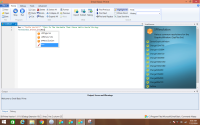
I Was Using SVB It Has Some Good Function For Better Code Writing.
I Got Some Functions So That If They Can Be Add In SB-Prime It Would Be Great As Small Basic Can't Update Anymore.
1) This Feature Is For Adding Intellisense To Variables So That We Could More Cleary Know What This Variable Is For
EX:
Code: Res = "Hello World!!" 'This Is The Variable That Store Hello World String.
TextWindow.WriteLine(Res)
SB-Prime:
SVB:
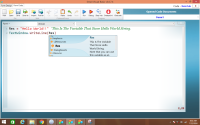
so you could see if there is a function in SB-Prime For just showing some Intellisense like that it would be great
And May Be We Could Also Add Intellisense To Event And Label Also In Same Way
|
|
|
|
| How to think correctly? |
|
Posted by: AbsoluteBeginner - 07-23-2024, 01:48 PM - Forum: Discussion
- Replies (47)
|
 |
(translated by Google translator)
Hi all.
Friends, I started this topic because it concerns not only each of us, but also Small Basic.
This concerns us because each of us would like to live among SMART people. If there is someone here who are pleased with current a huge number of problems caused by human stupidity, then let this person write about it here. Because I have never met such a person before.
At the same time, our Small Basic has a very good chance of helping many people learn to think correctly.
Even now Small BASIC is easy to use and has great capabilities. The fact that now everyone can create programs in their native language using Aliases in the SB-Prime editor is an incredible achievement.
But, there remains one more big obstacle that does not allow many people to learn how to PROGRAM first the behavior of a computer, and then the sequence of events in their lives. This obstacle is the inability of some people to visualize in their minds the structure they require. ( I mean a structure into which various objects are combined that are necessary to achieve a goal. )
That's why I suggest talking about the program creation tool using DIAGRAM.
I have a program development environment in which I can create executable files by placing icons of various objects on the canvas and drawing the necessary connections between them.
In addition to executable files, I can convert the logic depicted in the diagram into source code for any programming language.
If I use such a diagram, then I do not need to have the natural ability to see in my mind's eye (see in my mind) large enough sections of the structure of software objects. Using a diagram, I can always easily trace the connections between objects and the sequence of actions in the program I am creating.
It’s hard for me to explain in words all the benefits of using such a diagram.
If you are also sure that DRAWING programs will be much easier for ordinary people than WRITING code using tedious lines of text, then tell me.
Then I will continue my story about the diagram in detail and with illustrations. 
Thank you.
|
|
|
|
| How Does Slider Work ? |
|
Posted by: ata - 07-16-2024, 06:51 AM - Forum: Challenges
- Replies (6)
|
|
Hi everybody  The following does not work properly.Could you please help me understand the slider logic? The following does not work properly.Could you please help me understand the slider logic?
Code: x[1]= Shapes.AddText(1)
Shapes.Zoom(x[1],7,7)
Shapes.Move(x[1],600,120)
For i= 2 To 12
x[i]= Shapes.AddText(i)
Shapes.Zoom(x[i],7,7)
y= Shapes.GetTop(x[i-1])
Shapes.Move(x[i],600,y+105)
y= Shapes.GetTop(x[i])
EndFor
LDControls.SliderMaximum= 2
Slider= LDControls.AddSlider(40,600,"V")
Shapes.Move(slider,500,100)
t= LDControls.SliderGetValue(slider)
Stack.PushValue("t",t)
LDControls.SliderChanged= change
Sub change
t= Stack.PopValue("t")
z= LDControls.SliderGetValue(slider)
If z>t Or z=t Then
For i= 1 To 12
Shapes.Move(x[i],600,Shapes.GetTop(x[i])-2)
EndFor
v= LDControls.SliderGetValue(Slider)
Stack.PushValue("t",v)
ElseIf z<t then
For i= 1 To 12
Shapes.Move(x[i],600,Shapes.GetTop(x[i])+2)
EndFor
v= LDControls.SliderGetValue(Slider)
Stack.PushValue("t",v)
EndIf
EndSub
|
|
|
|
|